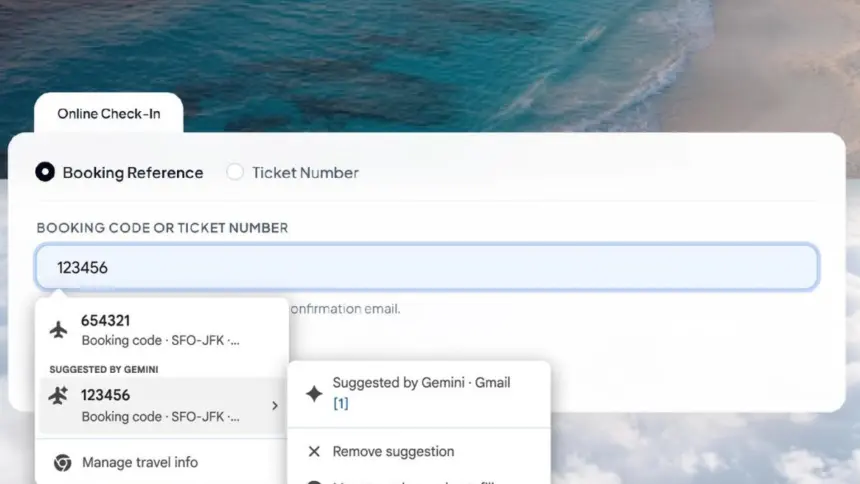
Google has launched an update to its browser that connects Gemini Chrome autofill directly to Gmail, allowing users in the United States to extract order codes, tracking details and flight bookings from their inboxes into online forms on desktop, Android and iOS devices.
Key points
- The browser scans Gmail to surface dynamic information such as parcel tracking numbers, hotel bookings and order codes directly inside form fields.
- Users see suggestions marked under a new “Suggested by Gemini” menu when tapping supported text boxes.
- The system relies on Google‘s Personal Intelligence framework and is rolling out to US account holders across desktop, Android and iOS.
- Google states that sensitive data remains encrypted and that users can manage access or disable the extraction tool entirely in Chrome settings.
How Gmail extraction works in Chrome
Standard browser autofill has long handled static data. For years, browsers have stored fixed records such as credit card numbers, billing addresses, saved passwords and contact details. When a user clicked into a checkout page, Chrome supplied the stored entry from a local database or Google account profile.
The updated tool shifts Chrome from static storage to dynamic extraction. Rather than relying solely on predetermined profile fields, the browser uses Gemini to read unstructured messages inside a linked Gmail inbox. When an online form requests specific information, such as an airline booking reference or a courier package number, Chrome searches recent emails to find the matching entry.
When the browser identifies relevant data, it presents the entry in the standard autofill drop-down list under a header labelled “Suggested by Gemini”. Clicking or tapping the entry fills the form field. The interface also displays the specific email source from which the model retrieved the figures, allowing the user to verify where the information came from before submitting the page.

Google said the initial release focuses on common transactional details. These include flight confirmation numbers, hotel reservation codes, package tracking IDs, membership identifiers and recent order numbers. It can also suggest physical addresses, telephone numbers and payment details discovered within email receipts.
Personal Intelligence and the testing path
The feature builds on Personal Intelligence, an architecture Google introduced to connect its Gemini assistant to core workspace services. Through this layer, Gemini can query private data across multiple Google applications to answer direct user prompts.
Google first previewed the autofill capability in May, before moving it into active testing in experimental Chrome Canary builds earlier this year. In those initial test versions, the system was configured to pull information from a broader range of sources, including Google Photos and other connected apps. Testers could prompt the browser to fetch images or details stored across several account services.
For the public rollout, Google narrowed the scope. The stable release currently draws exclusively from Gmail messages. Limiting the initial launch to email allows the company to test extraction accuracy on structured receipts, booking confirmations and shipping alerts before expanding to less structured media such as photograph libraries.

The deployment follows earlier expansions to Chrome’s data tools. Last year, Google broadened enhanced autofill to source passport numbers, national identity details and loyalty cards stored inside Google Wallet and central account dashboards. Integrating Gmail moves the tool from curated identity lockers into active communications.
Privacy controls and data encryption
Connecting an automated language model to an email inbox introduces immediate questions about data access and privacy. Inboxes routinely hold sensitive financial statements, medical appointments, private correspondence and authentication credentials.
Google said all sensitive data queried by the tool remains encrypted during transit and processing. The company stated that users maintain full control over the feature through Chrome settings. Account holders can delete individual suggestions from the drop-down menu if an incorrect or unwanted record appears. Users can also turn off the enhanced autofill integration entirely without losing standard form-filling tools like saved passwords or street addresses.
Privacy advocates and technology analysts have raised questions about how data accessed by automated assistants interacts with broader advertising systems. Tech publications noted that Google recently revised policy terms regarding how data linked to Personal Intelligence might interact with personalised advertising displays. Google told reporters that sensitive Gmail information handled by autofill is protected, though the precise operational boundaries between form suggestions and account profiling remain an area of scrutiny for regulators and users alike.
The feature is not turned on by default for every browser installation. To see suggestions, an individual must have Gemini in Chrome active and have opted into the Personal Intelligence framework across their Google account.
The battle for the browser interface
Automating form inputs represents a practical application of generative models within everyday software. While standalone chatbots require users to leave their current web page, browser-level assistants embed AI directly into daily navigation tasks.
The update mirrors earlier conveniences introduced by mobile operating systems. Apple won widespread praise when it introduced automatic SMS verification code detection in iOS, sparing users from switching back and forth between messaging apps and web browsers. By extracting tracking codes and booking numbers from email, Google aims to eliminate the friction of searching an inbox in a separate tab while completing a transaction.
The browser market has become the primary arena for tech companies seeking to deploy assistant software. Microsoft has embedded its Copilot tools across the Edge browser, offering page summaries, sidebar generation and automated search. Google has counterbalanced those moves by embedding Gemini directly into the Chrome address bar, side panel and tab management systems.
For Google, integrating Gmail deeply into Chrome serves a clear retention purpose. Users who rely on automatic inbox retrieval are more likely to stay within Google’s software ecosystem across both mobile devices and desktop computers. It turns Chrome into an active assistant rather than a passive viewing window.
Availability and next steps
The enhanced autofill integration is rolling out gradually to users located in the United States. It is available across desktop versions of Chrome for Windows, macOS and ChromeOS, as well as the mobile Chrome applications for Android and iOS.
Google has not announced a specific timeline for expanding the feature to international markets, where stricter digital privacy regulations such as the European Union’s General Data Protection Regulation apply to cross-service data processing. The company has also not confirmed when integrations with other Google apps tested during the Canary phase will return to the stable release.