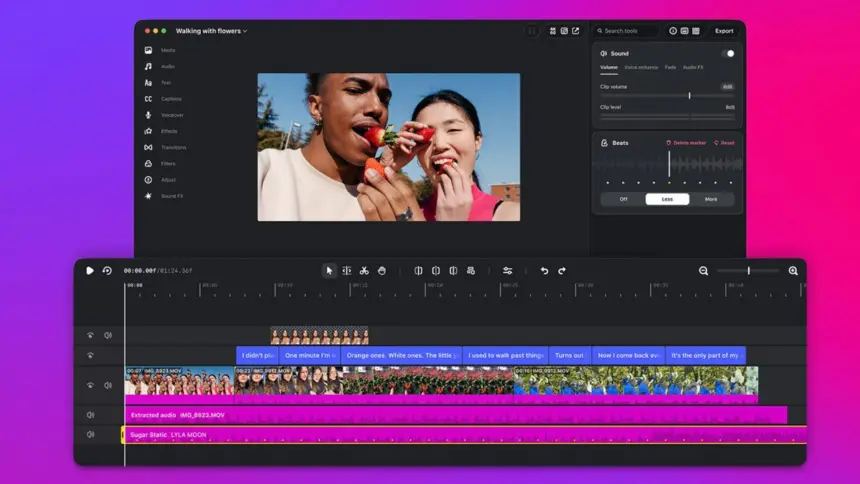
Instagram has launched its standalone video editing application, Instagram Edits for Mac, bringing multi-track video editing, watermark-free 4K exports and direct integration with artificial intelligence agents to desktop computers. The free macOS release arrived on Thursday, targeting creators working on longer projects that outgrow mobile phone screens.
Key points
- Instagram released Edits as a free desktop application for macOS, requiring Apple silicon hardware.
- The software integrates with the Model Context Protocol, allowing AI agents like Meta’s Muse to assemble rough cuts from local files.
- The desktop timeline includes multi-track controls, colour grading wheels, custom font imports and watermark-free 4K exports.
- Cross-device project syncing remains in development, with no desktop versions currently available for Windows or Linux.
How AI agents build rough cuts
The standout addition in the desktop release is support for the Model Context Protocol (MCP). The protocol provides an interface that allows external software agents to access tools inside the video editor directly.
Matthew Simari, Instagram’s head of product management for Edits, told The Verge that the desktop release includes an MCP interface covering all tools within the software. Creators can connect Meta’s Muse agent or another assistant of their choice to inspect footage, make tool calls and assemble an initial edit.
Simari said users can “go back and forth from agentic to manual editing.” A creator can instruct an agent to scan clips in a local folder, build a rough cut, and save a project file. The creator can then open that file inside Edits to polish the sequence by hand.

The desktop agent integration builds on AI features Instagram previously added to mobile devices. In September, the company introduced an AI creative assistant to the mobile app, which analyses account metrics including view counts and viewer retention to suggest video changes.
Desktop editing tools and 4K exports
Beyond agent connectivity, the desktop application expands on features originally built for mobile phones. Brett Westervelt, head of Edits, wrote in a company blog post that user demand drove the move to larger screens.
“A lot of creators have described the same moment to us: a project gets too big for your phone,” Westervelt said. He pointed to projects with dozens of clips where precise trimming on a touchscreen becomes difficult.
The desktop interface provides a multi-track timeline, keyframes for transitions, and detailed audio waveforms for beat-matching cuts. For visual adjustments, Instagram added colour wheels, curves and log conversions, alongside options to import custom lookup tables and font files.

The software also includes unlimited automatic captions in multiple languages, royalty-free audio libraries, and customisable keyboard shortcuts that users can map to match other video editing software. Exports are watermark-free at 4K resolution across vertical and horizontal aspect ratios. Completed videos can be published directly to Instagram with account tags, locations and trial reel settings intact.
Competition with CapCut
Instagram first launched Edits on mobile devices last year to challenge CapCut, the editing app owned by TikTok parent ByteDance. CapCut has offered desktop versions for Windows and macOS since 2021.
Instagram reported that more than 50 million creators now use the mobile version of Edits. The company noted that creators often had to edit widescreen clips on desktop computers, transfer files to mobile phones, and apply finishing touches before posting.
Bringing Edits to the desktop gives Meta a way to support creators producing widescreen and long-form content, allowing them to publish directly from a desktop interface without moving files between devices.
Hardware requirements and project limits
The new desktop editor remains restricted to Apple hardware. The application requires a Mac running Apple silicon, starting with the M1 chip, and an active Instagram account login.
Project mobility is also limited at launch. Creators cannot yet start an edit on mobile and finish it on desktop, though saved audio and text styles do sync between versions. Meta said it is building cross-platform project support and plans to release weekly updates to the Mac application.