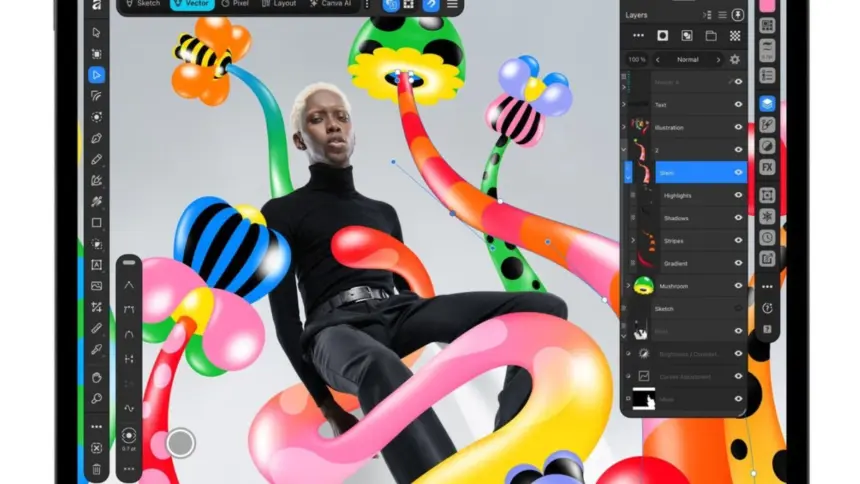
Canva launched Affinity for iPad on Monday, releasing a unified creative suite for Apple tablets that combines vector graphics, photo editing, page layout, and freehand sketching into a single application. The software is free to download for individual users and requires a free Canva account to run.
Key points
- Affinity for iPad unifies previously separate illustration, photo retouching, and desktop publishing tools into one workspace.
- The core design engine is free for individuals, while generative AI features require a paid Canva Pro subscription.
- The interface includes support for Apple Pencil Pro gestures such as barrel roll, squeeze, and hover.
- Files use the shared .af format, allowing projects to move between iPadOS, macOS, and Windows without conversion.
A unified canvas for tablet design
The release marks the completion of Canva’s effort to merge the Affinity ecosystem on mobile hardware. Before the overhaul, developer Serif sold Affinity Designer, Affinity Photo, and Affinity Publisher as distinct standalone applications on iPadOS and desktop computers. Last year, Canva combined those separate tools into an all-in-one desktop application. The tablet version mirrors that setup, allowing illustrators and art directors to complete complex projects without switching between three different programmes.
Instead of juggling apps, users switch between dedicated studios inside the same workspace. The app handles raw image development, vector path editing, typography systems, and multi-page spreads. Everything saves directly into a single proprietary .af container, preventing broken layer hierarchies and eliminating the need to export intermediate files. Users can start a piece on a desktop workstation and continue refining it on an iPad during transit.
Canva said more than seven million people signed up for the unified desktop edition after its debut. Bringing that workflow to mobile hardware had been the chief request from those users, according to Duncan Clark, chief executive of pro design at Canva. “Today we’re delivering it: a fully-fledged, professional app built for touch,” Clark said in Canva’s announcement.

Sketch Studio and Apple Pencil Pro controls
Rather than shrinking the desktop user interface, the development team rebuilt the controls around touch targets and stylus hardware. A central addition is Sketch Studio, a space tailored for rough concept drawings and early storyboards. Designers can draw freehand with customisable brushes that respond to pressure and tilt angles. Sketches stay live as native layers inside the document rather than requiring artists to export raster images and trace over them manually.
The sketching engine also incorporates automated vector conversion. An integrated tool called Sketch to Shapes analyses rough stylus marks and converts them into cleaner geometric shapes and editable curves with precise anchor points. That allows a designer to block out an icon or brand mark by hand and refine the mathematical paths immediately afterwards.
The app takes full advantage of hardware sensors on the Apple Pencil Pro. Stylus actions support barrel roll to rotate shaped brushes naturally, squeeze gestures to summon shortcut palettes, and hovering sensors that preview brush footprints before the nib touches the glass. Haptic feedback and standard pressure sensitivity also apply across the drawing, masking, and retouching brushes.
Photo retouching and publication layouts
Beyond freehand illustration, the suite retains the full pixel-editing capabilities of Affinity Photo. Photographers can import RAW camera files, assemble composites with thousands of layers, and apply non-destructive colour grades. A specialised masking brush uses edge detection to trace around complex outlines, such as loose hair and tree foliage, letting users cut out subjects quickly using the precision of the stylus.

For editorial designers, the layout studio supports multi-page projects such as catalogues, lookbooks, and magazines. It includes typographic styling controls, master pages, baseline grids, and proper colour management to prepare commercial press files directly on an iPad. The software also imports and exports industry-standard formats, preserving compatibility with teams using software from other vendors.
Neil Ladkin, head of product design at Affinity, said the interface choices came from active tablet artists. “Affinity for iPad delivers the full power of Affinity, together with the versatility and portability of iPad,” Ladkin said, pointing to details like canvas rotation and thumb-accessible palettes.
The freemium model and Canva AI
Canva acquired Nottingham-based Serif in 2024. The acquisition sparked worry across the creative community that Canva would discard Affinity’s traditional perpetual licensing in favour of mandatory recurring fees, mirroring the subscription structure used by Adobe Creative Cloud. While Canva has shifted the software toward an online account system, the company has kept the standard toolset free of charge.
Individual users receive vector tools, photo adjustments, sketch brushes, and layout settings without paying a subscription. The monetization focuses instead on automated machine learning features through Canva AI Studio. Creative professionals who want generative tools must subscribe to Canva Pro, which starts at $18 per month.
These optional cloud tools include Generative Expand to invent background margins beyond the original camera frame, automatic noise suppression, and neural resolution upscaling. Another feature, Decompose Layer, scans a flattened photograph or graphic and breaks it down into separate, editable component layers automatically.
Launch omissions and system requirements
Although the iPad edition reads the same file format as Mac and Windows builds, Canva omitted several specialised desktop utilities from the first tablet release. Photographers will not find the dedicated Astrophotography Studio, and high-volume production studios cannot run batch image processing or automated data merge workflows on the tablet yet. Advanced diagnostic panels, such as detailed scopes and histogram info overlays, are also absent alongside macro automation.
Canva has said it plans to restore parity across more of those niche desktop features through subsequent software updates over the coming year.
The application is available on the App Store as a free download for tablets running iPadOS 18.0 or later.