Microsoft has released an optional update that redesigns the Windows 11 right-click menu, giving users direct control over which commands and application shortcuts appear in File Explorer. The change arrived on 28 October 2026 as part of preview release KB5127936, aiming to resolve long-standing complaints about menu clutter and sluggish response times.
Key points
- An optional preview update for Windows 11 versions 25H2 and 26H2 introduces a customisable right-click context menu in File Explorer.
- Users can hide unwanted commands, manage third-party app extensions and replace modern icon strips with standard text commands such as Cut and Copy.
- The update loads faster and reorganises system actions, but Microsoft is rolling the feature out gradually across eligible devices.
- The broader release includes cloud system rebuilds without USB media and an update mechanism for expiring Secure Boot certificates.
How to customise the context menu
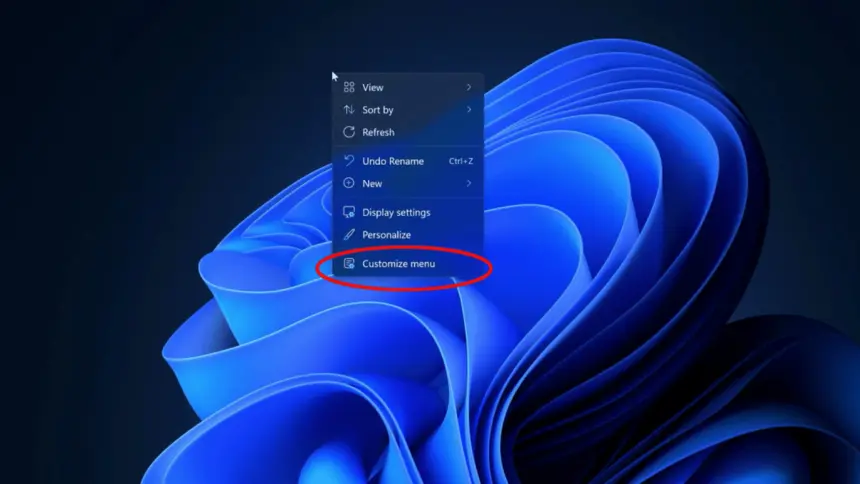
The updated File Explorer interface introduces a dedicated “Customize menu” entry at the foot of the right-click display. Selecting this option opens configuration settings where users can audit every action permitted to run inside the context menu. Anyone who frequently uses basic file operations can now strip away commands they never touch, including legacy tools such as “Send to” or the standard Print command.
The redesign also tackles third-party software clutter. Historically, desktop programs added shell extensions automatically, stretching menus across the entire vertical height of the display. Under the new Windows 11 update, users can choose whether an installed program appears directly on the main surface or sits grouped inside a tidy secondary list.
For users who disliked the condensed icon bar introduced at the launch of Windows 11, the update offers a way back to traditional desktop conventions. The row of compact icons representing Cut, Copy, Paste, Rename, Delete and Share can be converted into labelled text rows. This brings the visual structure closer to the interface found in Windows 10, while allowing people to reposition items such as Properties to the bottom of the stack.

Addressing five years of interface complaints
When Microsoft launched Windows 11 in 2021, the company attempted to simplify the desktop by condensing common clipboard actions into a top ribbon of icon buttons. Lesser-used commands were relegated behind a “Show more options” click, which simply called up the legacy Windows 10 menu inside an unstyled box.
Instead of speeding up daily navigation, the two-tier structure doubled the number of clicks required for routine technical tasks. Early builds also suffered from brief micro-stutters, taking hundreds of milliseconds to draw shell extensions whenever someone clicked on large folders or network drives.
Microsoft claims the revised architecture loads far faster while stripping out background rendering bloat. In documentation accompanying the release, the company stated that “the updated menu opens more quickly, reduces clutter, and gives you more control over the commands and app extensions that appear when you right-click.” Initial community feedback on discussion forums confirmed noticeable speed improvements on modern storage drives, even though several testers questioned why structural menu personalisation required five years of development.
What else arrived in the KB5127936 update
The context menu overhaul is one part of cumulative build KB5127936, which advances Windows 11 version 25H2 to build 26200.9818 and version 26H2 to build 26300.9818. Across both branches, the package delivers 41 individual adjustments and non-security fixes.

Among the major functional additions is Cloud rebuild, a disaster recovery mechanism designed to restore broken computers without physical media. If an operating system installation corrupts and fails to boot, Cloud rebuild can pull clean Windows system files and certified hardware drivers directly from Windows Update. The recovery environment does not require a bootable USB drive or local recovery partition, provided the device can reach an active network connection.
To assist with recovery scenarios, the Windows Recovery Environment (WinRE) now reuses wireless network profiles already registered inside the desktop operating system. Devices attempting quick machine recoveries or cloud rebuilds can connect automatically to saved Wi-Fi access points, including enterprise networks that rely on certificate-based authentication, without requiring manual network configuration before repair begins. IT administrators retain the ability to disable this automatic reconnection behaviour.
The package also introduces a Restore Summary screen displayed after bringing a backup profile across to a fresh computer. The report lists the specific operating system settings and Microsoft Store applications successfully transferred, helping users confirm the state of their migration. Windows Settings also gains an updated Privacy & security screen that consolidates camera, microphone and location permission controls onto a primary management panel.
Power management received attention through an altered adaptive hibernate policy for Modern Standby. The system curbs automatic hibernation while battery capacity remains above 80 percent, but initiates deep hibernation sooner once power drops under 10 percent to safeguard remaining battery reserves during transport.
For handheld devices and controller navigation, Microsoft revised the Xbox mode gaming interface. A redesigned Gaming Task View adds a navigation bar with direct access to desktop exits and power controls without requiring players to close active games.
Secure Boot certificate updates and system restarts
Alongside the desktop enhancements, the software maker is preparing machines for an upcoming cryptographic milestone. Original Secure Boot certificates created in 2011 will reach their expiration dates in late June 2027. Microsoft began rolling out refreshed certificates earlier this year, following a technical advisory warning users and IT admins to plan for the certificate rollover across commercial fleets.
Applying these firmware-level certificates alters system boot registries, which can trigger an extra reboot during standard update cycles. On its release health dashboard, Microsoft noted that a small share of personal and corporate PCs will restart once more while the security files are applied.
How to get the update and rollout timing
Because KB5127936 is an optional monthly preview release, computers will not install it automatically through standard background schedules. Users who want early access must open Settings, choose Windows Update, select Advanced options, and check the Optional updates area. The package will download automatically only if the user has previously enabled the option to receive the latest updates as soon as they become available.
Installing the download does not guarantee immediate access to the rebuilt context tools. Microsoft is distributing the File Explorer adjustments via a controlled feature rollout, activating the code on small batches of machines to test stability before broadening reach. Administrators and end users who install the patch immediately may still see the older right-click interface until server-side configuration flags activate on their specific machine.
For the wider public, the context menu changes, Cloud rebuild tools and privacy settings updates will fold into the mandatory November Patch Tuesday release, which arrives in the second week of November 2026.